Amazon Listing Image Optimization: Clone Top Seller Styles for Higher Conversions [2026]
Master Amazon listing image optimization with this complete guide. Learn how to clone top seller styles, meet Amazon requirements, and boost your conversion rates by 30-50%.
![Amazon Listing Image Optimization: Clone Top Seller Styles for Higher Conversions [2026]](/images/blog/ad-clone-dest.webp)
Amazon Listing Image Optimization: Clone Top Seller Styles for Higher Conversions
Your product images are the single most important factor determining whether Amazon shoppers click “Add to Cart” or scroll past. Studies show 75% of shoppers rely on images when making purchase decisions, and listings with professional images see conversion rate improvements of 30-50%.
The challenge? Creating images that actually convert requires understanding what works in your niche. Instead of guessing, smart sellers clone proven visual styles from top-performing competitors — and in this guide, you’ll learn exactly how.
Quick Summary: Analyze bestseller image styles → Meet Amazon’s technical specs → Shoot your product → Clone winning styles with AI → Build a 9-image set → A/B test and iterate.
Why Amazon Listing Images Matter More Than Price
Products with professional main images get 2.5x more clicks than amateur photos — even when priced 10-15% higher. Amazon’s search algorithm heavily weights CTR and conversion rate, creating a compounding effect: better images → more clicks → higher ranking → more visibility → more sales.
Every category also has unwritten visual rules:
- Electronics: Clean, minimalist, feature-focused
- Fashion: Lifestyle context, model shots, fabric details
- Home & Kitchen: Usage scenarios, size context
- Beauty: Texture close-ups, ingredient highlights
Failing to match these expectations immediately signals “amateur seller” to potential customers.
Step 1: Analyze Top Competitor Listings
Before creating a single image, understand what’s already winning in your category.
Search your main keyword and identify products with Best Seller badges, 500+ reviews, and 4.5+ star ratings. Screenshot their top 10 listings and document:
| Element | What to Analyze | Why It Matters |
|---|---|---|
| Main Image Style | Background, lighting, angle, props | Determines CTR from search |
| Color Palette | Warm vs cool, saturation levels | Evokes emotional response |
| Lifestyle Context | Usage scenarios, environments | Helps visualize ownership |
| Feature Callouts | Detail shots, annotations | Addresses purchase objections |
Organize your “swipe file” by lighting approach (bright/dark, warm/cool), composition style (centered vs dynamic), and visual complexity (minimal vs detailed).
Pro Tip: Use FocalFlow Ad Clone’s reference image analysis to automatically extract the 18 visual dimensions that make each competitor’s images effective — including lighting direction, color temperature, and compositional balance.
Step 2: Understand Amazon Image Requirements
For a deep dive, see our Amazon Product Image Requirements 2026 guide. Here’s the essential checklist:
Main Image (Strictly Enforced)
| Requirement | Specification |
|---|---|
| Background | Pure white (RGB 255,255,255) |
| Image Size | 2000×2000px minimum (for zoom) |
| File Format | JPEG, PNG, TIFF, or GIF |
| File Size | Under 10MB |
| Product Fill | 85% of frame |
| Prohibited | Text, watermarks, logos, borders |
Secondary Images (More Flexible)
Secondary images allow text overlays, lifestyle backgrounds, infographics, and multiple products. Still aim for 2000px minimum resolution. Use all 9 available slots:
- Main image (white background)
- Lifestyle/context (2-3 images)
- Feature highlights (2-3 images)
- Dimensions/size reference
- Usage instructions
- Comparison chart or brand story
Step 3: Capture Your Product Photos
Quality input determines quality output. Even with AI enhancement, starting with good photos is essential.
Minimal setup ($50-100): smartphone with 12MP+ camera, white poster board, natural light from a large window, and a tripod. Position your product in center, use white foam boards to fill shadows, and shoot at the highest resolution.
Shooting checklist:
- ☐ Front angle + 3/4 angle + top-down view
- ☐ Close-ups of key features
- ☐ Product in use (lifestyle)
- ☐ Scale reference (next to common object)
- ☐ Packaging/unboxing shot
Smartphone tips: Use Portrait Mode for edge detection, enable grid lines for centering, shoot in daylight near a window, and clean your lens before shooting.
Step 4: Clone Winning Styles with AI
Here’s where it all comes together. Instead of learning complex Photoshop techniques, use AI to apply proven visual styles to your products.
How It Works
- Select Reference: Choose a successful competitor’s Amazon image
- Upload Your Product: Use your white-background product photo
- AI Analysis: System extracts lighting, composition, color grading across 18 dimensions
- Style Transfer: AI applies those elements to your product
- Download: Output ready for Amazon upload
Why this works: You’re applying aesthetics that are already proven to convert in your specific subcategory — no guesswork needed. For a deeper dive into the cloning methodology, read our How to Clone Competitor Ad Styles with AI guide.
See the Difference
Here’s the actual Ad Clone workflow — reference ad, your product photo, and the AI-generated result:
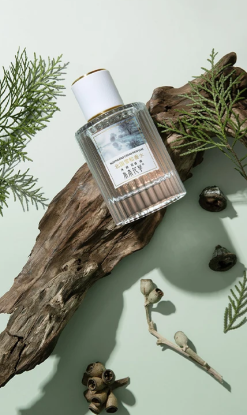
① Reference ad — the winning visual style you want to replicate
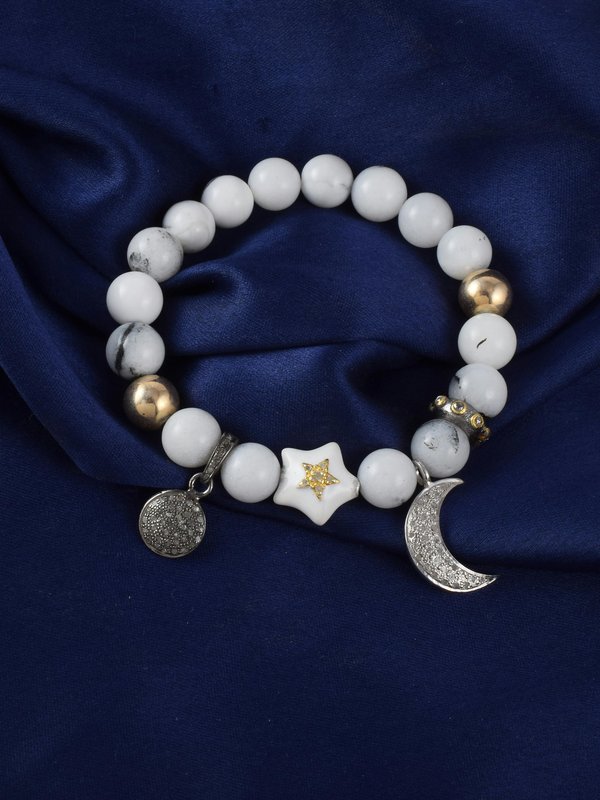
② Your product photo — simple background, basic lighting
③ AI result — your product presented in the reference style, ready for Amazon
Same product, completely different visual impact. The AI preserves your product’s authentic appearance while applying the proven visual language that drives conversions.
**→ **Try FocalFlow Ad Clone free — upload a reference image and your product photo to generate Amazon-optimized images in under 30 seconds.
Generate Multiple Variations to Test
Don’t stop at one. Create 3-5 variations using different reference styles:
- Studio Professional: Clean, bright, white background
- Lifestyle Context: Product in use, warm tones
- Feature Focus: Dramatic lighting highlighting key features
- Minimalist Modern: Simple, uncluttered, contemporary
Step 5: Build Your 9-Image Set
Your main image gets the click. Your supporting images get the conversion.
| Slot | Purpose | Key Tips |
|---|---|---|
| Image 1 | Main (white background) | 85% fill, best converting angle |
| Image 2 | Lifestyle hero | Product in beautiful usage context |
| Image 3 | Feature highlight | Close-up of key differentiator |
| Image 4 | Benefits infographic | Text overlay with key benefits |
| Image 5 | Dimensions/scale | Next to common object for reference |
| Image 6 | Usage instructions | Step-by-step, reduces returns |
| Image 7 | Comparison chart | Your product vs basic alternative |
| Image 8 | Package contents | Sets delivery expectations |
| Image 9 | Brand story / A+ | Build trust and brand recognition |
All 9 images should feel like a cohesive set — consistent lighting, matching color grading, unified brand aesthetic. Use the same cloned style across all images for visual consistency.
Mobile matters: 60% of Amazon shoppers browse on mobile. Test that your main image is clear at thumbnail size and infographic text is readable on small screens.
Step 6: Upload and A/B Test
Manual Split Test Method
- Run Image A for 14 days → record sessions, conversion rate, units sold
- Switch to Image B for 14 days → compare metrics
- Keep winner, test new variation against it
Key Metrics
| Metric | Target Improvement |
|---|---|
| Click-Through Rate | +20% minimum |
| Conversion Rate | +15% minimum |
| Return Rate | <5% |
When to Update
- Immediately: Competitors launch with significantly better visuals, or return rate exceeds 10%
- Quarterly: Test new main image variations and seasonal refreshes
- Bi-annually: Complete visual brand refresh
Common Mistakes to Avoid
Technical: Blurry images (use 2000px+), wrong background color (must be pure white), text on main image (Amazon will suppress your listing).
Strategic: Generic stock photos (customers recognize these), inconsistent style across images, ignoring mobile optimization, copying exact competitor images (copyright violations).
Conversion-killing: Hiding product flaws (leads to negative reviews), cluttered backgrounds, inconsistent colors between images.
Your Action Plan
This week:
- Mon-Tue: Research top 10 competitors, document visual patterns
- Wed-Thu: Shoot product photos, use FocalFlow Ad Clone to generate style variations
- Fri: Upload to Seller Central, verify mobile appearance
Next 30 days: Monitor baseline → launch A/B test at week 4 → implement winner
Ongoing: Monthly competitor review, quarterly seasonal refresh.
Key Takeaways
Amazon listing image optimization is about systematic execution, not creative guesswork:
- Study Winners — analyze what visual styles already work in your category
- Meet Requirements — follow Amazon’s technical specs precisely
- Clone Strategically — use AI to apply proven styles to your products
- Test Relentlessly — let data guide your image decisions
On Amazon, your images are your salespeople. Make them work as hard as possible.
Ready to optimize your Amazon listings? Try FocalFlow Ad Clone free and create Amazon-optimized product images in under 30 seconds. Clone the winning styles of top sellers in your category and start competing at the highest level.
Related Resources
- Amazon Product Image Requirements 2026 - Complete technical specs and compliance guide
- How to Clone Competitor Ad Styles with AI - Deep dive into reverse-engineering competitor visuals
- AI Ad Clone Tool: Complete Guide - Full ad cloning methodology
- Product Photography A/B Testing - Scientific image optimization